API authentication: tokens and credentials
Part of the function exists; the page names precisely what is missing.
How an API call is authenticated: a staff member's session token, second factor, step-up verification, machine credentials and correlation.
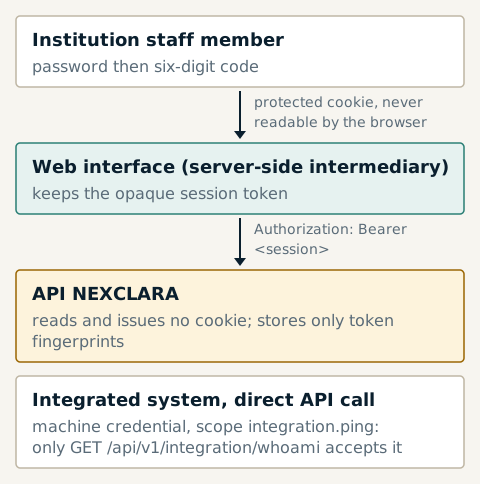
The NEXCLARA API receives its authentication in the HTTP Authorization
header, as a bearer token. It neither reads nor issues any cookie: it
therefore needs neither credentialed cross-origin sharing nor an anti-forgery
token. Two identity families exist, and neither replaces the other: a
human session does not open machine operations, and a machine credential
does not open operations reserved for staff.
A staff member's session
Opening a session follows the same path as the sign-in screen:
POST /api/v1/auth/loginwith the institution reference, the address and the password. The response returns an opaque session token, shown only once, in the "second factor required" state.POST /api/v1/auth/second-factorwith the six-digit code, presenting that token. The session moves to the "authenticated" state.- Subsequent calls present the token:
GET /api/v1/me HTTP/1.1
Authorization: Bearer <session token>
X-Request-ID: <optional correlation identifier>
The platform keeps only the fingerprint of the token. A session expires
after 30 minutes of inactivity and 12 hours at most (default values);
POST /api/v1/auth/logout revokes it. Suspending or deactivating an account
revokes all its sessions.
Step-up verification
Sensitive actions (role assignment, suspension, policy approval, issuing a
machine credential…) require a second factor verified within the last 10
minutes. POST /api/v1/auth/step-up renews that verification with a new
code, without opening a new session.
Machine credentials
The institution administrator issues machine credentials from ADMIN: a name, explicit scopes and, optionally, an expiry date. The secret is shown only once; only its fingerprint is kept. A credential can be revoked immediately.
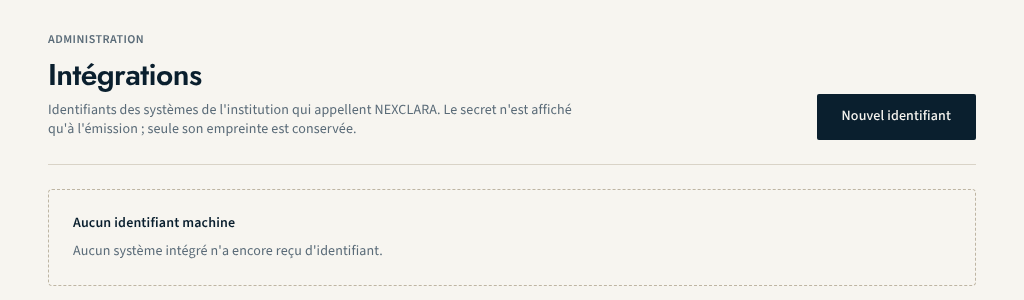
Only one scope exists today, and a single operation accepts a machine
credential:
GET /api/v1/integration/whoami, which requires the integration.ping scope
and lets an integrated system check its credential. A human session is
refused there.
Correlation
Every response carries the X-Request-ID header. If the caller provides one,
it is reused after cleaning (ASCII letters and digits, hyphen and underscore,
8 to 64 characters); if it is missing or unusable, the platform generates one.
The same identifier appears in the body of every error response: it is the
reference to give for any investigation (see
Error protocol).
What is still under construction
- no business operation is open to machine credentials: applications, imports and evidence currently require the session of an authorised staff member;
- the OpenAPI contract does not declare a security scheme yet: the API reference says so, and this page stands in for it;
- no identity federation (OIDC, SAML) with the institution's directory.
About this page
- Editorial status
- Approved
- Written by
- Équipe produit NEXCLARA
- Reviewed by
- claude-relecteur-independant
- Approved on
- October 16, 2026
- Revision
- 2
- Updated
- October 15, 2026
- Classification
- Public