Importing applications from a CSV file
Part of the function exists; the page names precisely what is missing.
Versioned data contract, per-product template, upload, pre-validation without creating applications, confirmed import and provenance of each value.
LINK creates applications from a CSV extract of the institution's system, without any development in that system. LINK is still being delivered: this first slice is driven from the application's "Imports" screen or through the API, whose operations are grouped in the "link" family of the reference.
The data contract
The file follows a versioned and closed contract, link-contract
version 1:
- a common envelope: the institution's application reference, applicant reference and type, dates (application, data observation);
- the product's decision variables: exactly the inputs of the policy in force. Data the policy does not read is not requested;
- no outcome column (default, litigation, arrears).
An unknown column makes the file non-importable, unless the mapping explicitly declares it ignored. An unsupported contract version is refused, without conversion.
A product's template
For each product, the platform produces a CSV template: semicolon separator, UTF-8 with a byte order mark, one metadata line then the header, without any example row. The metadata line rejects a human error early (template of another product, outdated version); it authorises nothing.
Synthetic example: no real data
#nexclara-link;contract=link-contract;version=1;product=MICRO-EX;columns=0123456789abcdef
external_reference;applicant_reference;applicant_kind;application_date;requested_amount;term_months
DOS-EX-0001;CLI-EX-0001;natural_person;2026-09-30;500000.00;12
DOS-EX-0002;CLI-EX-0002;natural_person;2026-09-30;250000.00;#NA
This extract is a file filled in from the template: the template itself has no data row. It is reduced to a few columns for readability: a real template carries every input of the product's policy, in the order given by the platform.
Steps
- Upload the file: surface checks (empty file, size, strict UTF-8 encoding, binary or archive content refused), storage in the institution's space, SHA-256 fingerprint.
- Pre-validate: reading, column mapping, row-by-row checking with the same rules as DESK entry, and a report. Pre-validation creates no application.
- Review the report: counts, problems by code and category, recognised, unknown or missing columns. A CSV error report quotes the faulty values, neutralised against formula injection in a spreadsheet.
- Confirm the import with a client-chosen idempotency key: the batch is queued and processed in the background. Replaying the same key returns the same batch; a file already imported for this product is refused.
- Follow the batch and its quality: completeness, validity, uniqueness, computed on the data actually recorded.
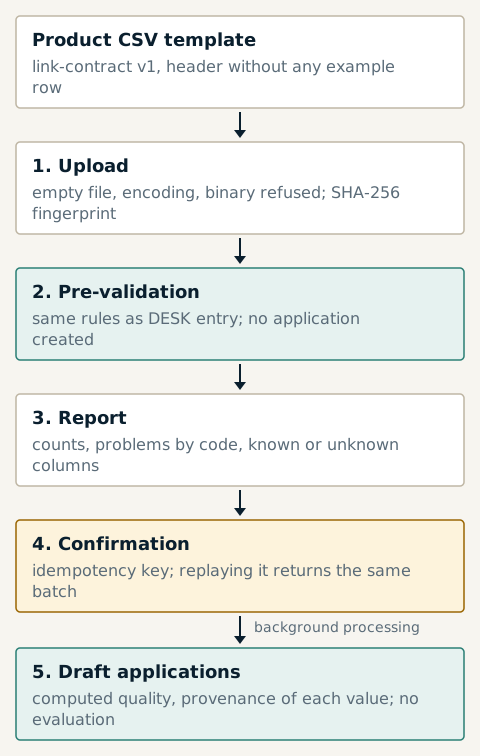
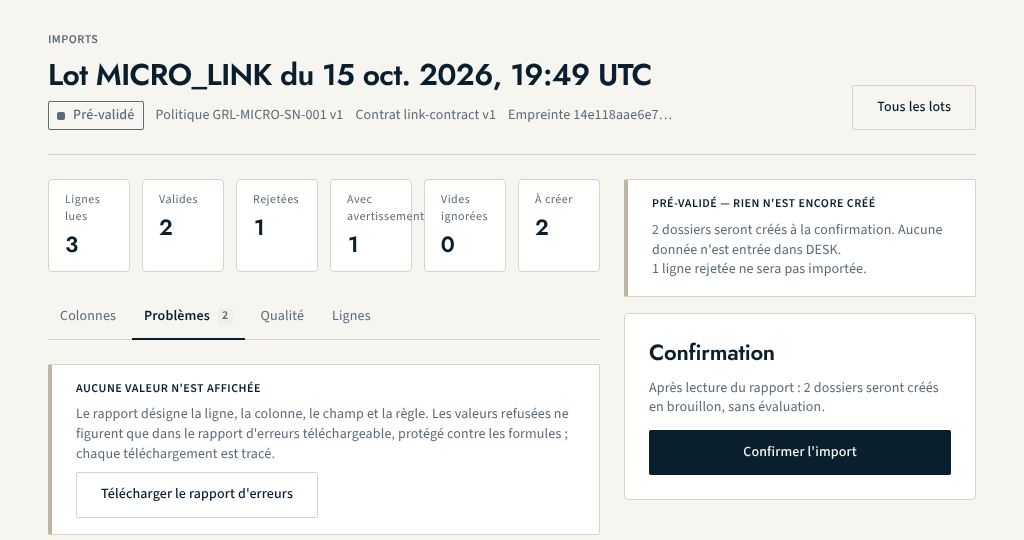
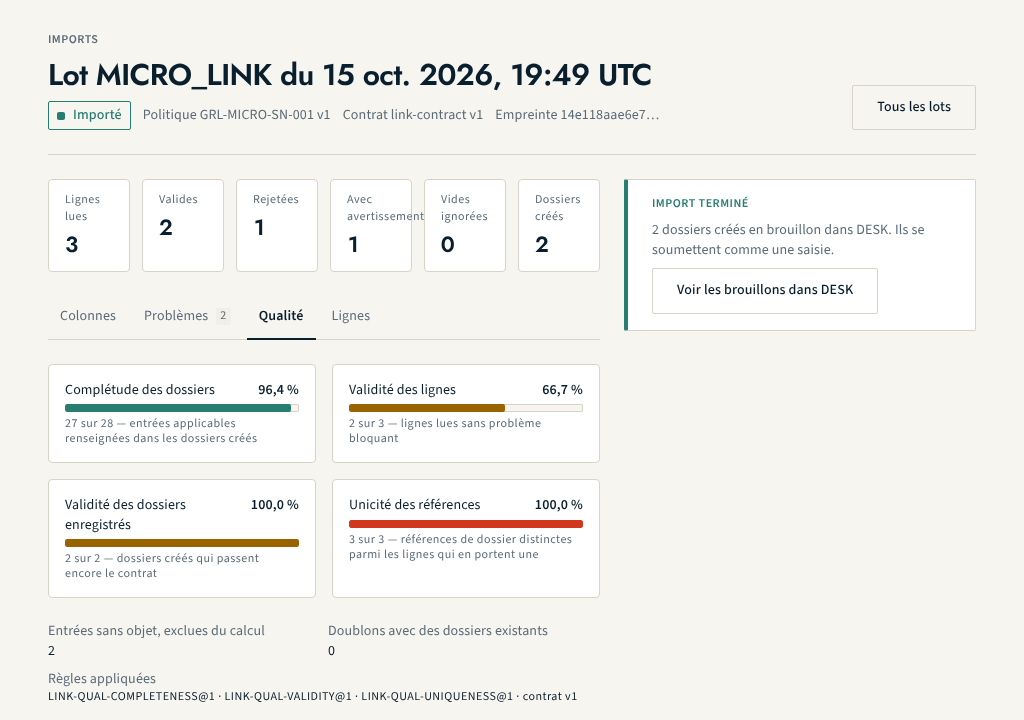
The applications created are drafts; they are submitted to the engine like an on-screen entry. The import alone produces no evaluation.
Missing values and provenance
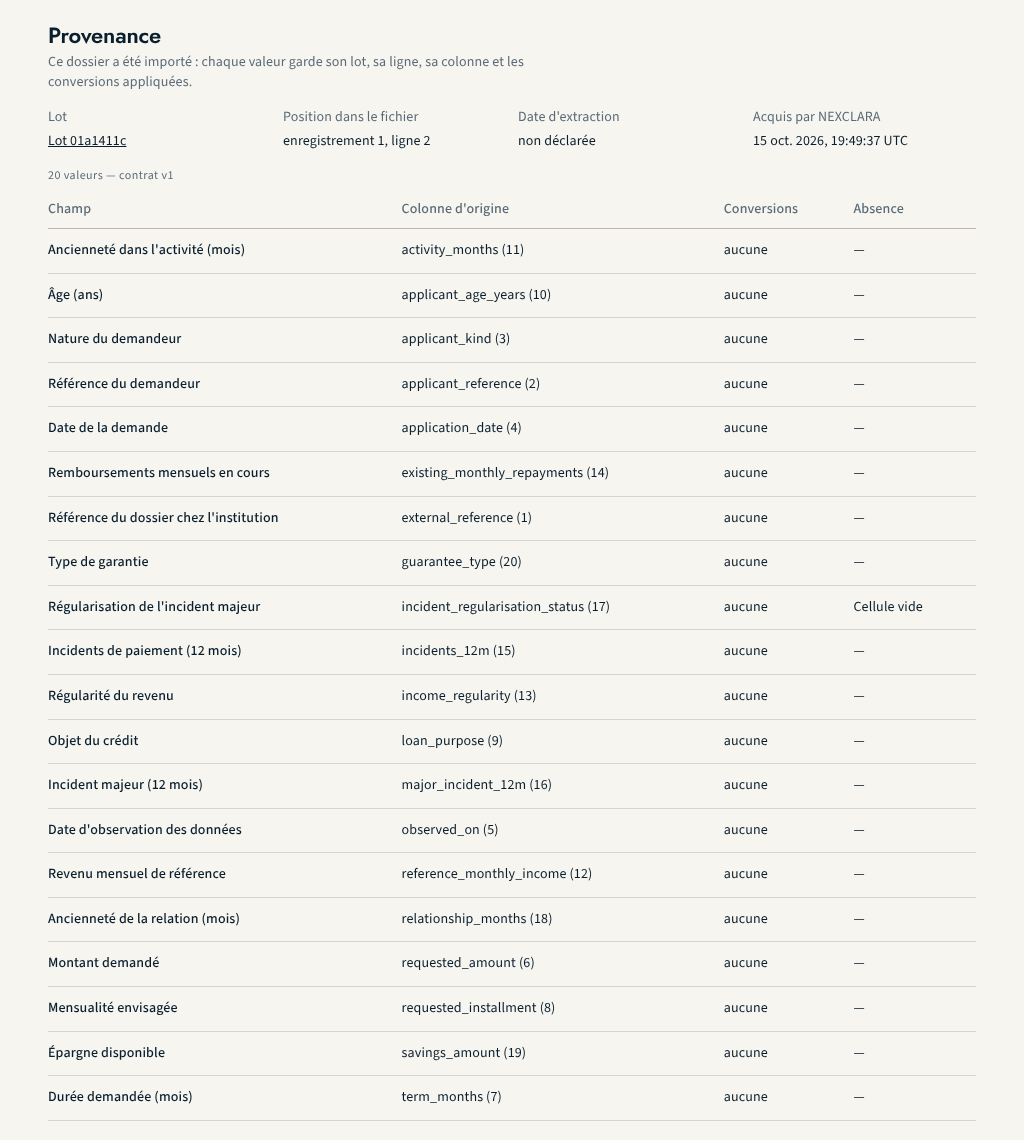
An empty cell is missing data; the tokens #UNKNOWN, #NA and #NR say why
it is missing. A missing value never becomes zero. Each imported value keeps
its provenance: batch, row, column, conversions applied, contract version,
acquisition time and declared extraction date. On the DESK record of an
imported application, a "Provenance" tab shows it; the TRUST evidence file
carries it, with the fingerprint of the original file.
What is still under construction
- the import requires the session of an authorised staff member: analyst or credit manager to upload and confirm, audit and compliance to read;
- no spreadsheet format (XLSX), no automated drop on a secure space;
- machine credentials do not open these operations yet;
- no import rollback, no output back to the institution's systems.
About this page
- Editorial status
- Approved
- Written by
- Équipe produit NEXCLARA
- Reviewed by
- claude-relecteur-independant
- Approved on
- October 16, 2026
- Revision
- 4
- Updated
- October 16, 2026
- Classification
- Public