Signing in and two-factor authentication
The function described exists and is tested; the page also states what it does not do.
Activating an account from an invitation, enrolling the second factor, signing in and understanding session durations.
Every NEXCLARA account belongs to a single institution and lives in that institution's space. No account crosses institutions. The platform's operators have no account in your space, with one exception: the support identity created for an exceptional access, separate from every institution account, read-only and time-bound (see Architecture overview). Every human account is protected by a password and a mandatory second factor: no account exists without a second factor.
Activating an account from an invitation
An account is always created from an invitation issued by an administrator of your institution, who sets your roles when issuing it. Activation takes three steps, on the page opened by the link you received:
- Invitation check: the screen shows the institution, the address and the intended roles, together with the expiry date.
- Second-factor enrolment: the platform generates an authentication key and displays it only once, as a QR code and as text. Add it to an authenticator app that supports six-digit time-based codes (TOTP).
- Display name, account language, password choice and entry of a first code: this code proves that the key is enrolled. The account becomes active at that moment, with its second factor.
An invitation can be used only once and expires after 72 hours (default value, configurable by the operator). The invitation token travels in the part of the address that is never sent to the server, and the page removes it from the address bar as soon as it has read it.
The password has at least 12 characters. No composition rule is imposed: a passphrase is both safer and easier to remember. It can neither repeat your address nor contain the part before "@" when that part has at least four characters.
Signing in
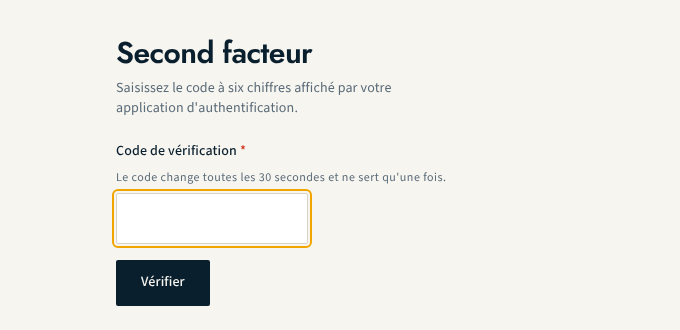
Signing in takes two steps:
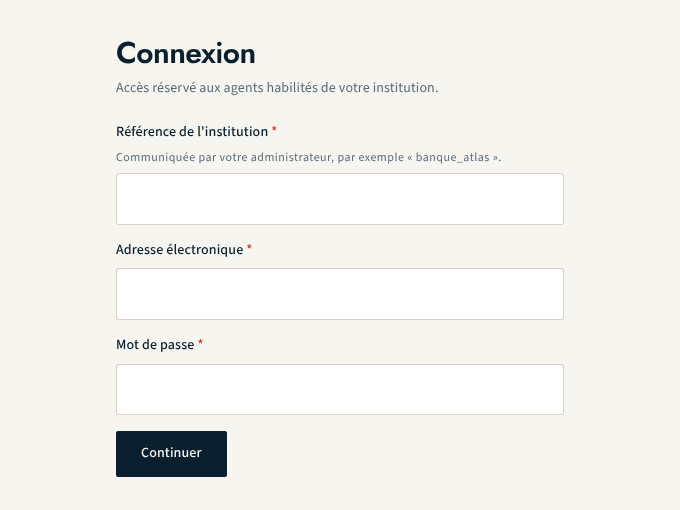
- enter your institution reference (provided by your administrator), your address and your password;
- enter the six-digit code shown by your authenticator app. A code can be used only once.
The institution reference is required because no address lookup is ever performed across institutions. If any piece of information is wrong, the response is always the same, whatever the error: the platform does not reveal whether an institution or an address exists.
Durations and lockout
| Item | Default value |
|---|---|
| "second factor pending" step | 5 minutes |
| session inactivity | 30 minutes |
| absolute session lifetime | 12 hours |
| lockout after failures | 5 consecutive failures, 15 minutes |
| step-up verification | second factor verified within 10 minutes |
These values are deployment parameters. Some sensitive actions (role assignment, suspension, deactivation, policy approval, issuing a machine credential) require a recently verified second factor: the screen then asks for it again, without losing what you entered.
What this function does not do
- No reset of the password or of the second factor, neither self-service nor by an administrator: a new invitation is refused for an address that already holds an account, even a suspended or deactivated one. No recovery procedure is built yet.
- No identity federation (OIDC, SAML) with the institution's directory, and no hardware passkeys for institution accounts.
- No compromised-password check against an external service: the platform makes no outbound call for that purpose.
To administer accounts and roles, see Accounts, roles and invitations.
About this page
- Editorial status
- Approved
- Written by
- Équipe produit NEXCLARA
- Reviewed by
- claude-relecteur-independant
- Approved on
- October 16, 2026
- Revision
- 2
- Updated
- October 15, 2026
- Classification
- Public